
Laravel Dashboard Laravel Package
spatie/laravel-dashboard
Build beautiful, Livewire-powered dashboards in Laravel. Provides base CSS, dashboard and tile view components, and a Tile model to persist fetched data so tiles can update themselves via polling.
title: Time and Weather tile weight: 3
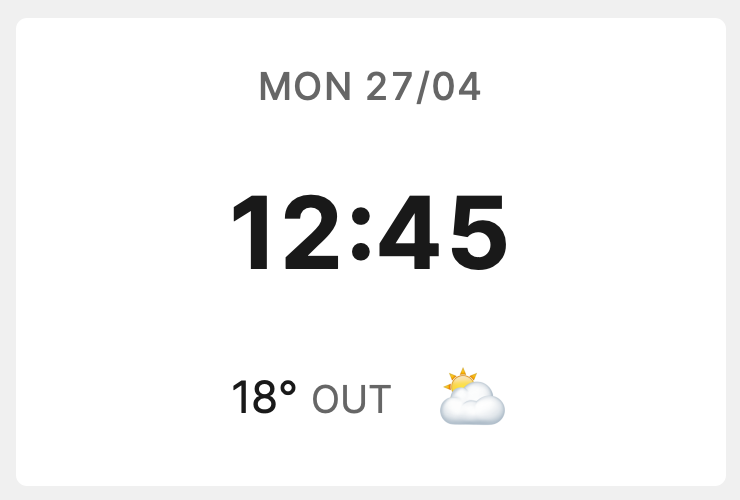
This tile displays the time, weather, and optionally a rain forecast.
Installation
You can install the tile via composer:
composer require spatie/laravel-dashboard-time-weather-tile
In the dashboard config file, you must add this configuration in the tiles key.
Sign up at https://openweathermap.org/ to obtain OPEN_WEATHER_MAP_KEY
Head to https://www.buienradar.nl/ to get your cities BUIENRADAR_LATITUDEand BUIENRADAR_LONGITUDE
// in config/dashboard.php

return [
    // ...
    'tiles' => [
        'time_weather' => [
            'open_weather_map_key' => env('OPEN_WEATHER_MAP_KEY'),
            'open_weather_map_city' => 'Antwerp',
            'units' => 'metric', // 'metric' or 'imperial' (metric is default)
            'buienradar_latitude' => env('BUIENRADAR_LATITUDE'),
            'buienradar_longitude' => env('BUIENRADAR_LONGITUDE'),
        ],
    ],
];
In app\Console\Kernel.php you should schedule the Spatie\TimeWeatherTile\FetchOpenWeatherMapDataCommand to run every minute.
If you want to rain forecast, and the Buienradar service supports your location, you can optionally schedule the Spatie\TimeWeatherTile\FetchBuienradarForecastsCommand too.
// in app/console/Kernel.php

protected function schedule(Schedule $schedule)
{
    // ...
    $schedule->command(\Spatie\TimeWeatherTile\Commands\FetchOpenWeatherMapDataCommand::class)->everyMinute();
    $schedule->command(\Spatie\TimeWeatherTile\Commands\FetchBuienradarForecastsCommand::class)->everyMinute();
}
Usage
In your dashboard view you use the livewire:time-weather-tile component.
<x-dashboard>
    <livewire:time-weather-tile position="a1" />
</x-dashboard>
Customizing the view
If you want to customize the view used to render this tile, run this command:
php artisan vendor:publish --provider="Spatie\TimeWeatherTile\TimeWeatherTileServiceProvider" --tag="dashboard-time-weather-tile-views"
How can I help you explore Laravel packages today?