Discord Php Laravel Package
team-reflex/discord-php
DiscordPHP is a PHP wrapper for Discord’s REST, gateway, and voice APIs. Build Discord bots that run in CLI with ReactPHP-style async handling. Includes limited docs/class reference and community integrations like Laracord for Laravel.
title: "Message Components"
Message components are new components you can add to messages, such as buttons and select menus. There are currently four different types of message components:
ActionRow
Represents a row of buttons on a message. You can add up to 5 buttons to the row, which can then be added to the message. You can only add buttons to action rows.
$row = ActionRow::new()
    ->addComponent(Button::new(Button::STYLE_SUCCESS));
Functions
| name | description |
|---|---|
addComponent($component) |
adds a component to action row. must be a button component. |
removeComponent($component) |
removes the given component from the action row. |
getComponents(): Component[] |
returns all the action row components in an array. |
Button
Represents a button attached to a message.
You cannot directly attach a button to a message, it must be contained inside an ActionRow.
$button = Button::new(Button::STYLE_SUCCESS)
    ->setLabel('push me!');
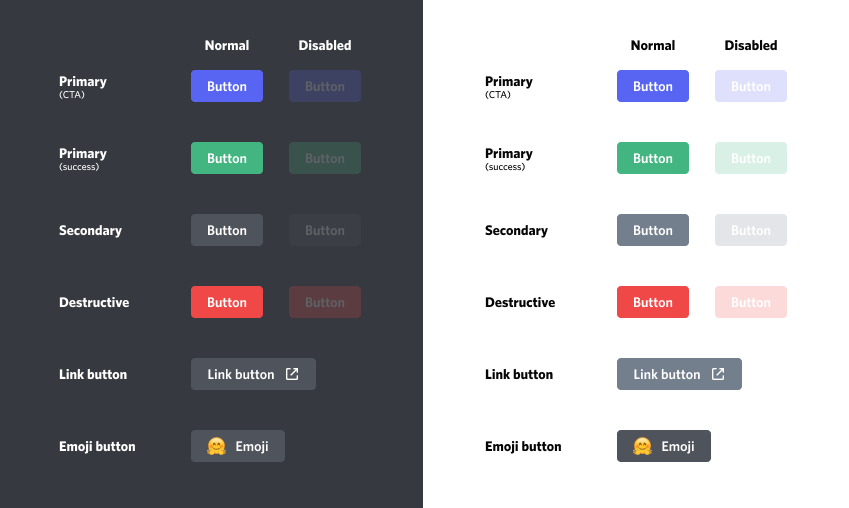
There are 5 different button styles:
| name | constant | colour |
|---|---|---|
| primary | Button::STYLE_PRIMARY |
blurple |
| secondary | Button::STYLE_SECONDARY |
grey |
| success | Button::STYLE_SUCCESS |
green |
| danger | Button::STYLE_DANGER |
red |
| link | Button::STYLE_LINK |
grey |
Functions
| name | description |
|---|---|
setStyle($style) |
sets the style of the button. must be one of the above constants. |
setLabel($label) |
sets the label of the button. maximum 80 characters. |
setEmoji($emoji) |
sets the emoji for the button. must be an Emoji object. |
setCustomId($custom_id) |
sets the custom ID of the button. maximum 100 characters. will be automatically generated if left null. not applicable for link buttons. |
setUrl($url) |
sets the url of the button. only for buttons with the Button::STYLE_LINK style. |
setDisabled($disabled) |
sets whether the button is disabled or not. |
setListener($listener, $discord) |
sets the listener for the button. see below for more information. not applicable for link buttons. |
removeListener() |
removes the listener from the button. |
Adding a button listener
If you add a button you probably want to listen for when it is clicked.
This is done through the setListener(callable $listener, Discord $discord) function.
The callable $listener will be a function which is called with the Interaction object that triggered the button press.
You must also pass the function the $discord client.
$button->setListener(function (Interaction $interaction) {
    $interaction->respondWithMessage(MessageBuilder::new()
        ->setContent('why\'d u push me?'));
}, $discord);
If the interaction is not responded to after the function is called, the interaction will be automatically acknowledged with no response. If you are going to acknowledge the interaction after a delay (e.g. HTTP request, arbitrary timeout) you should return a promise from the listener to prevent the automatic acknowledgement:
$button->setListener(function (Interaction $interaction) use ($discord) {
    return someFunctionWhichWillReturnAPromise()->then(function ($returnValueFromFunction) use ($interaction) {
        $interaction->respondWithMessage(MessageBuilder::new()
            ->setContent($returnValueFromFunction));
    });
}, $discord);
SelectMenu
Select menus are a dropdown which can be attached to a message. They operate similar to buttons. They do not need to be attached
to an ActionRow. You may have up to 25 Options attached to a select menu.
$select = SelectMenu::new()
    ->addOption(Option::new('me?'))
    ->addOption(Option::new('or me?'));
Functions
| name | description |
|---|---|
addOption($option) |
adds an option to the select menu. maximum 25 options per menu. options must have unique values. |
removeOption($option) |
removes an option from the select menu. |
setPlaceholder($placeholder) |
sets a placeholder string to be displayed when nothing is selected. null to clear. max 150 characters. |
setMinValues($min_values) |
the number of values which must be selected to submit the menu. between 0 and 25, default 1. |
setMaxValues($max_values) |
the maximum number of values which can be selected. maximum 25, default 1. |
setDisabled($disabled) |
sets whether the menu is disabled or not. |
setListener($listener, $discord) |
sets the listener for the select menu. see below for more information. |
removeListener() |
removes the listener from the select menu. |
Option functions
| name | description |
|---|---|
new($label, ?$value) |
creates a new option. requires a label to display, and optionally an internal value (leave as null to auto-generate one). |
setDescription($description) |
sets the description of the option. null to clear. maximum 100 characters. |
setEmoji($emoji) |
sets the emoji of the option. null to clear. must be an emoji object. |
setDefault($default) |
sets whether the option is the default option. |
getValue() |
gets the internal developer value of the option. |
Adding a select menu listener
Select menu listeners operate similar to the button listeners, so please read the above section first. The callback function will
be called with the Interaction object as well as a collection of selected Options.
$select->setListener(function (Interaction $interaction, Collection $options) {
    foreach ($options as $option) {
        echo $option->getValue().PHP_EOL;
    }

    $interaction->respondWithMessage(MessageBuilder::new()->setContent('thanks!'));
}, $discord);
TextInput
Text inputs are an interactive component that render on modals.
$textInput = TextInput::new('Label', TextInput::TYPE_SHORT, 'custom id')
    ->setRequired(true);
They can be used to collect short-form or long-form text:
| style | constant |
|---|---|
| Short (single line) | TextInput::STYLE_SHORT |
| Paragraph (multi line) | TextInput::STYLE_PARAGRAPH |
Functions
| name | description |
|---|---|
setCustomId($custom_id) |
sets the custom ID of the text input. maximum 100 characters. will be automatically generated if left null. |
setStyle($style) |
sets the style of the text input. must be one of the above constants. |
setLabel($label) |
sets the label of the button. maximum 80 characters. |
setMinLength($min_length) |
the minimum length of value. between 0 and 4000, default 0. |
setMaxLength($max_length) |
the maximum length of value. between 1 and 4000, default 4000. |
setValue($value) |
sets a pre-filled value for the text input. maximum 4000 characters. |
setPlaceholder($placeholder) |
sets a placeholder string to be displayed when text input is empty. max 100 characters. |
setRequired($required) |
sets whether the text input is required or not. |
How can I help you explore Laravel packages today?