
Elfinder Laravel Package
studio-42/elfinder
elFinder is an open-source file manager for the web, built in JavaScript with jQuery UI and inspired by Mac OS X Finder. It offers a fast, convenient interface for managing files and folders, with PHP connector support via Composer and a wide ecosystem of third-party connectors and themes.
elFinder
WARNING: IF YOU HAVE OLDER (IN PARTICULAR 2.1.69 OR EARLIER) VERSIONS OF ELFINDER ON PUBLIC SERVERS, IT MAY CAUSE SERIOUS DAMAGE TO YOUR SERVER AND VISITED USER. YOU SHOULD UPDATE TO THE LATEST VERSION OR REMOVE IT FROM THE SERVER.
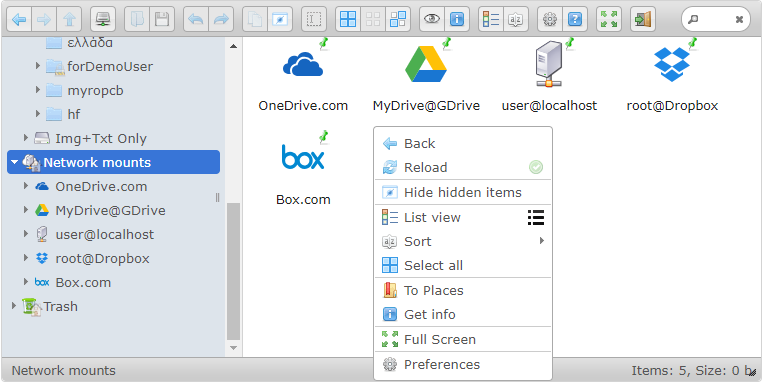
elFinder is an open-source file manager for web, written in JavaScript using jQuery UI. Creation is inspired by simplicity and convenience of Finder program used in Mac OS X operating system.







Contents
- Branches
- Features
- Requirements
- Installation
- Downloads
- Demo Sites
- FAQs
- 3rd Party Connectors
- 3rd Party Volume Drivers
- 3rd Party Themes
- Support
- Authors
- License
Branches
- master - Main development branch
- 2.1-src - 2.1 development branch, auto build to 2.1 on commit
- 2.1 - 2.1 nightly build branch
Features
- Usability like the MacOS Finder or Windows Explorer
- Mobile friendly view for touch devices
- All operations with files and folders on a remote server (copy, move, upload, create folder/file, rename, etc.)
- High performance server backend and light client UI
- Multi-root support
- Local file system, MySQL, FTP, SFTP, Box, Dropbox, GoogleDrive and OneDrive volume storage drivers
- Support AWS S3, Azure, Digital Ocean Spaces and more with League\Flysystem Flysystem driver
- Cloud storage (Box, Dropbox, GoogleDrive and OneDrive) drivers
- Background file/folder upload with Drag & Drop HTML5 support
- Chunked file upload for large file
- Upload directly to the folder
- Upload form URL (or list)
- List and Icons view
- Keyboard shortcuts
- Standard methods of file/group selection using mouse or keyboard
- Move/Copy files with Drag & Drop
- Drag & Drop to outside by starting drag with alt/option key press
- Archives create/extract (zip, rar, 7z, tar, gzip, bzip2)
- Rich context menu and toolbar
- Quicklook, preview for common file types
- Edit text files and images
- "Places" for your favorites
- Calculate directory sizes
- Thumbnails for image, movie files
- Easy to integrate with web editors (elRTE, CKEditor, TinyMCE)
- Flexible configuration of access rights, upload file types, user interface and other
- Extensibility by event handling of backend and client side
- Simple client-server API based on JSON
- Supports custom information in info dialog
- Configuable columns of list view
- Supports custom CSS class function for the custom folder icon
- Connector plugin
- AutoRotate : Auto rotation on file upload of JPEG file by EXIF Orientation.
- AutoResize : Auto resize on file upload.
- Normalizer : UTF-8 Normalizer of file-name and file-path etc.
- Sanitizer : Sanitizer of file-name and file-path etc.
- Watermark : Print watermark on file upload.
- For more details, see the Changelog
Requirements
jQuery / jQuery UI
- jQuery 1.8.0+
- jQuery UI 1.9.0+
- Required: draggable, droppable, resizable, selectable, button and slider
- Recommend: sorter (To make sortable the List column and the Places)
However, we recommend newest version.
Client
- Modern browsers both of desktop or mobile. elFinder was tested in newest Chrome, Edge, Firefox, IE and Opera
- Caution: Web App mode ("apple-mobile-web-app-capable" meta tag) on iOS is not work perfectly in elFinder
Server
- Any web server
- PHP 5.2+ (Recommend PHP 5.4 or higher) And for thumbnails - GD / Imagick module / convert(imagemagick) require
- Recommend PHP 7.1 or higher to supports non-ASCII character of file path/name on the Windows server
Installation
Builds (compressed)
- Download and unzip one of the builds below to your PHP server
- Rename
/php/connector.minimal.php-distto/php/connector.minimal.php - Load
/elfinder.htmlin your browser to run elFinder
Source (uncompressed)
-
Clone this repository to your PHP server
$ git clone https://github.com/Studio-42/elFinder.git -
Rename
/php/connector.minimal.php-distto/php/connector.minimal.php -
Load
/elfinder.src.htmlin your browser to run elFinder
Installer
Downloads
Stable releases (Changelog)
- elFinder 2.1.70
- elFinder 2.0.9 (deprecated)
Nightly builds
Demo sites
2.1.x Nightly
- https://studio-42.github.io/elFinder/ (with CORS)
FAQs
Should I use elFinder builds (compressed) or source (uncompressed)?
For debugging and development, use the source. For production, use builds.
How do I integrate elFinder with CKEditor/TinyMCE/elRTE/etc...?
Check out the wiki for individual instructions.
The procedure of language files created or modified?
You can create or modify the language file to use translation tool. Please refer to the pull request the results to the respective branch.
3rd party connectors
3rd party Volume Drivers
- League\Flysystem (PHP) (for elFinder 2.1+) driver for the Flysystem
3rd party Themes
Hint: How to load CSS with RequireJS?
- lokothodida/elfinder-theme-moono
- lokothodida/elfinder-theme-windows-10
- RobiNN1/elFinder-Material-Theme
- StudioJunkyard/elfinder-boostrap-theme
3rd party Integrations
- Django
- Drupal
- Laravel
- Roundcube
- Symfony
- Tiki Wiki
- WordPress
- XOOPS
- XOOPSCube GUI-based control panel: FTP, cloud storage and editors
- Yii
- Zenphoto
Support
Authors
- Current main developer: Naoki Sawada [email protected]
- Chief developer: Dmitry "dio" Levashov [email protected]
- Maintainer: Troex Nevelin [email protected]
- Developers: Alexey Sukhotin, Naoki Sawada [email protected]
- Icons: PixelMixer, Yusuke Kamiyamane, Icons8
We hope our tools will be helpful for you.
License
elFinder is issued under a 3-clauses BSD license.
How can I help you explore Laravel packages today?