Laravel deployer
(Streamlined Deployment for Laravel apps)
Introduction
Laravel Deployer: Streamlined Deployment for Laravel and Node.js apps, with Zero-Downtime and various environments and branches, deploying your Laravel apps become simple and stress-free endeavor.
Quick Start
- Install package .
composer require omaralalwi/laravel-deployer
- setup github connection if you ready did this, no need to do it again, else you can run following command to generate ssh key in your server to use it is your github account:
php artisan deploy:key-generate [email protected]
- update Env file configs as needed
DEPLOY_BRANCH="master"
DEPLOY_PATH="/project/root directory"
- start deploy
php artisan deploy:publish
Installation
You can install latest stable version of package via Composer:
composer require omaralalwi/laravel-deployer
publish all package resources
php artisan vendor:publish --provider="Omaralalwi\LaravelDeployer\LaravelDeployerServiceProvider"
Publish Only Config file
php artisan vendor:publish --tag=laravel-deployer-config
Configuration
You can configure Laravel deployer by adding the following default configuration keys to your .env file. If you do not add these, the default values will be used.
These environment configuration variables are used to customize the deployment process in Laravel Deployer.
summarize Environment Variables
| Variable Name | Required | Description | Default Value |
|---|---|---|---|
DEPLOY_BRANCH |
Yes | The Git branch to be deployed. | "master" |
DEPLOY_PATH |
Yes | Path to the root directory of your Laravel project on the server. | /project/root directory |
DEPLOY_BUILD_NPM |
No | Whether to run npm build commands during deployment. | false |
DEPLOY_RESTART_HORIZON |
No | Whether to restart Laravel Horizon after deployment. | false |
DEPLOY_RESTART_PHP_FPM |
No | Whether to restart PHP-FPM after deployment. | false |
DEPLOY_RESTART_PHP_FPM_COMMAND |
Only if DEPLOY_RESTART_PHP_FPM is true |
Command to restart PHP-FPM (if applicable). | "sudo systemctl restart php8.1-fpm.service" |
DEPLOY_SUDO_USER |
Only if DEPLOY_RESTART_PHP_FPM is true |
User for executing sudo commands during deployment. | "your system user" |
DEPLOY_SUDO_USER_PASSWORD |
Only if DEPLOY_RESTART_PHP_FPM is true |
Password for the sudo user (if applicable). | "your system user password" |
Environment Variables in Details
DEPLOY_BRANCH
- The Git branch to be deployed. Default Value
"master" - Default Value:
master - Example:
DEPLOY_BRANCH="main" - also you can override the default value in env by passing branch with deploy command. see customization section.
DEPLOY_PATH
- Path to the root directory of your Laravel project on the server.
- Default Value:
project directory in linuxbut in other os you should set it manually in ENV, just writepwdwhile you in root project directory and take it copy past. or any similar commands that show current path in other OS (windows , mac). - Example:
DEPLOY_PATH="/home/forge/laravel-deployer.com"
DEPLOY_BUILD_NPM
- Whether to run npm build commands during deployment.
- Default Value:
false - Example:
DEPLOY_BUILD_NPM=true - more options about custom nodejs commands , in Customization Section.
DEPLOY_RESTART_HORIZON
- Whether to restart Laravel Horizon after deployment.
- Default Value:
false - Example:
DEPLOY_RESTART_HORIZON=true
DEPLOY_RESTART_PHP_FPM
- Whether to restart PHP-FPM after deployment(Require user with Root access).
- Default Value:
false - Example:
DEPLOY_RESTART_PHP_FPM=false
DEPLOY_RESTART_PHP_FPM_COMMAND
if DEPLOY_RESTART_PHP_FPM is false you do not need for this.
- Command to restart PHP-FPM (if applicable).
- Default Value: null
- Example:
DEPLOY_RESTART_PHP_FPM_COMMAND="sudo systemctl restart php8.1-fpm.service"
DEPLOY_SUDO_USER
if DEPLOY_RESTART_PHP_FPM is false you do not need for this.
- User for executing sudo commands during deployment.
- Example:
DEPLOY_SUDO_USER="your-system-user"
DEPLOY_SUDO_USER_PASSWORD
if DEPLOY_RESTART_PHP_FPM is false you do not need for this.
-
Password for the sudo user (if applicable).
-
Example:
DEPLOY_SUDO_USER_PASSWORD="your-system-user-password"
all configuration variables in ENV file will look like :
DEPLOY_BRANCH="master"
DEPLOY_PATH="/project/root directory"
DEPLOY_BUILD_NPM=false
DEPLOY_RESTART_HORIZON=false
DEPLOY_RESTART_PHP_FPM=false
DEPLOY_RESTART_PHP_FPM_COMMAND="sudo systemctl restart php8.1-fpm.service"
DEPLOY_SUDO_USER="your system user"
DEPLOY_SUDO_USER_PASSWORD="your system user password"
These environment variables provide flexibility in configuring the deployment behavior for your Laravel application.
Final Note: do not forget to clear config and cache after any update for config file or ENV variables .
php artisan config:clear && php artisan cache:clear
Setup github SSH connection
Note: you must setup github connection via ssh not user and pass or https .
common developers already did this , but if you did not , do not worry, we made it easier just one command'
if you ready did this, no need to do it again, else you can run following command to generate ssh key in your server to use it is your github account:
php artisan deploy:key-generate [email protected]
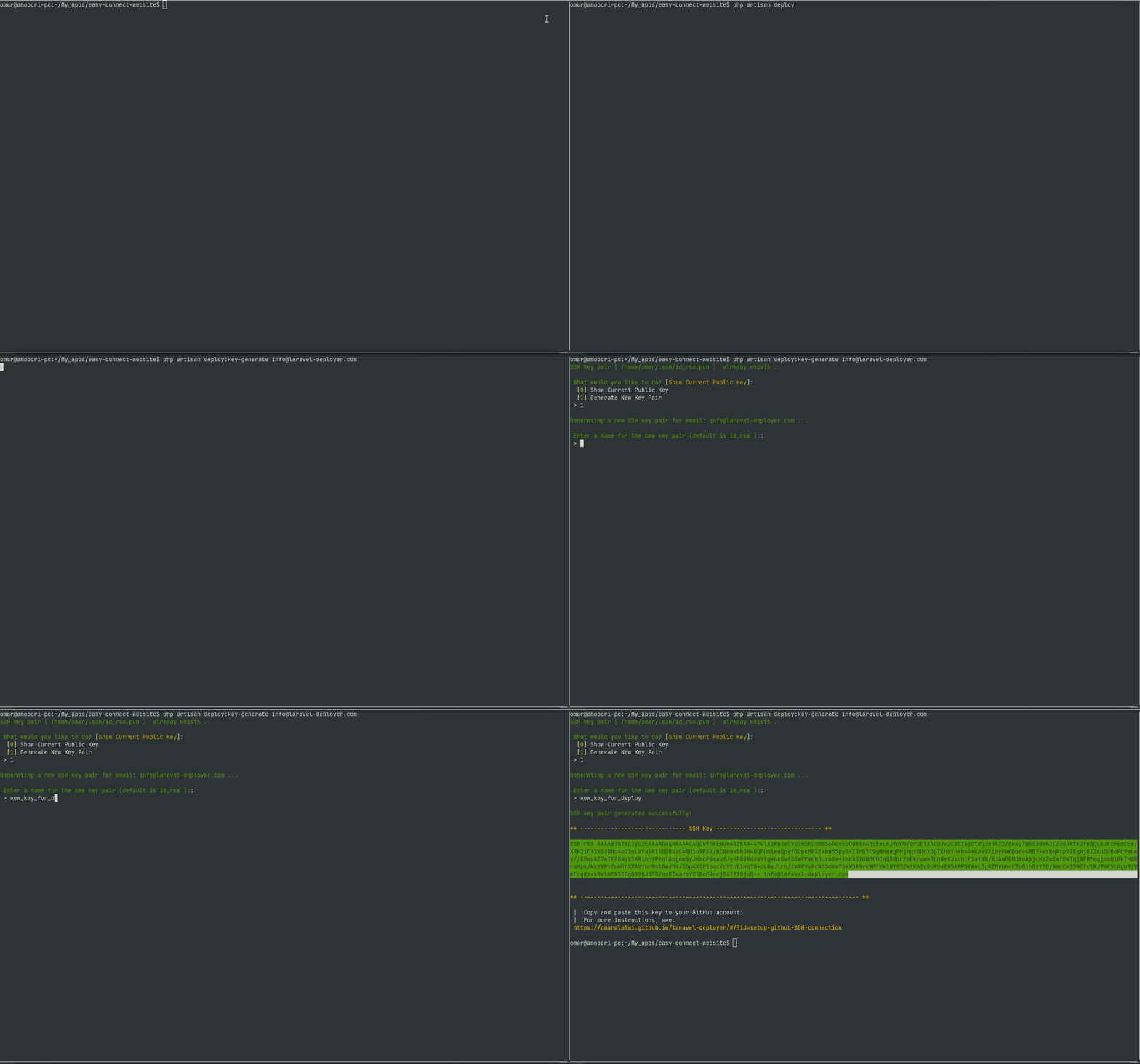
this command will generate the ssh key that you will see in screen:-
- copy it .
- got to your github account.
- navigate to settings .
- In the "Access" section of the sidebar, click SSH and GPG keys.
- Click New SSH key or Add SSH key.
- add title for key and past the key, then save.
- run console and test your SSH connection with github if don successfully
ssh -T [email protected].
more info about setup github ssh connection
- Generating a new SSH key and adding it to the ssh-agent
- Adding a new SSH key to your GitHub account
- Testing your SSH connection
Customization
Quick Deploy (Basic Usage)
by default : the deployment run without customizations .
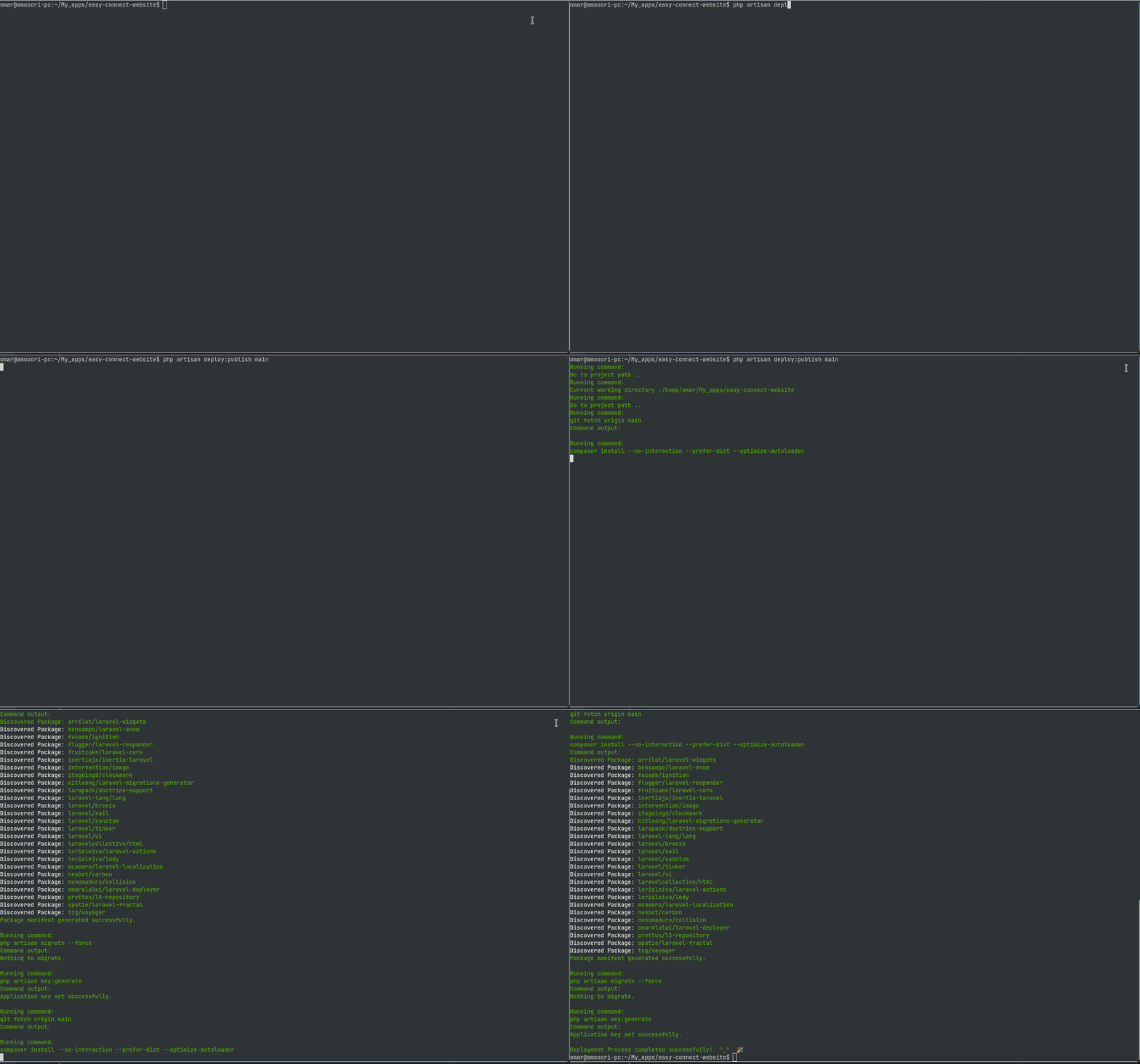
you can make a quick deploy with default options by running deploy command :
php artisan deploy:publish
Deploy specific branch
you can make a quick deploy with specific branch by passing that branch with command, else will use the DEPLOY_BRANCH value in end file, else will use default master .
php artisan deploy:publish dev
Deploy specific path
you can change deploy path by edit DEPLOY_PATH in env file. by default it will take the project path.
see configuration section for more details about this.
Deploy with Extra commands
you can add your own commands to deploy script, by adding them to extra_commands in config/laravel-deployer.php .
for ex for extra_commands
'extra_commands' => [
    'composer update', // we already did composer update in deploy script
    'php artisan notify-users-for-update'
],
Restart PHP FPM
*Note: this require user with root access.
this is optional, you can ignore it if no need to restart php fpm, it is false by default.
setup config to restart PHP
DEPLOY_RESTART_PHP_FPM=true
if it's value false you can ignore all following section about PHP-FPM.
because the various OS that running php , we let this command for you to add your own system command to restart php fpm. this depend on OS and php version .
for Ex: PHP 8.1 with Ubuntu Os
DEPLOY_RESTART_PHP_FPM_COMMAND="sudo systemctl restart php8.1-fpm.service"
PHP-FPM Restart commands with Famous OS
| Operating System | PHP Version | Command to Restart PHP-FPM |
|---|---|---|
| Ubuntu | PHP 8.1 | sudo systemctl restart php8.1-fpm.service |
| Debian | PHP 8.1 | sudo systemctl restart php8.1-fpm.service |
| CentOS | PHP 8.1 | sudo systemctl restart php-fpm.service (Note: CentOS uses a generic service name for PHP-FPM) |
| Fedora | PHP 8.1 | sudo systemctl restart php-fpm.service (Note: Fedora uses a generic service name for PHP-FPM) |
| Arch Linux | PHP 8.1 | sudo systemctl restart php-fpm.service (Note: Arch Linux uses a generic service name for PHP-FPM) |
| macOS | PHP 8.1 | sudo apachectl restart (Note: macOS uses Apache, which manages PHP-FPM through its configuration) |
| Windows | PHP 8.1 | Restart-Service WAS (Note: Windows uses Windows Process Activation Service (WAS) to manage PHP-FPM) |
just take the command according to your OS and edit php v then copy it to DEPLOY_RESTART_PHP_FPM_COMMAND in ENV file.
Add Root user to restart php-fpm.
because the Restart PHP-FPM need to Root user , we did it easily by addin root user with root access and his password to ENV variables alternate of insert them manually with every Deploy.
DEPLOY_SUDO_USER="your user"
DEPLOY_SUDO_USER_PASSWORD="your user password"
and the deploy script will take it and pass to system without need to insert it with every deploy.
Restart Laravel Horizon
common of laravel apps use laravel horizon, may be you will need to restart it with deploy, do not worry , just make DEPLOY_RESTART_HORIZON config variable ture .
DEPLOY_RESTART_HORIZON=true
Deploy with NPM Build
many of laravel apps use nodejs with laravel app, if you did this, just make DEPLOY_RESTART_HORIZON config variable to true.
DEPLOY_BUILD_NPM=true
this will do following commands depends on APP_ENV variable :
NPM production Commands
npm install
npm run build
NPM Dev Commands
npm install
npm run dev
Custom nodejs commands
if you have custom nodejs commands for deployment :-
Example Deploy nodejs with custom commands:
if you are using pnpm with pm2``, just make DEPLOY_BUILD_NPMfalse, and add thepnpm` commands as a extra commands.
your config file wil look like:-
DEPLOY_BUILD_NPM=false

ConfigKeys::EXTRA_COMMANDS => [
    "pnpm install",
    "pnpm run build"
],
Another Example with nodejs with Nuxt3 app , and deploy with pm2.
you can update extra commands in config/laravel-deployer.php file as following:-
    "npm install",
    "pm2 delete ecosystem.config.cjs",
    "npm run build",
    "pm2 start ecosystem.config.cjs --only your_domain.com --watch",
    "pm2 save"
Features
- Flexibility to customize .
- no need to root user if you do not enable php restart .
- deploy in specific branch easily .
- ability to add your own custom extra commands .
- Deploy laravel app with nodejs on it as needed .
- Deploy laravel with nodejs with many options.
- add your own OS command to restart php.
- check about ssh key , then generate it github if not exists .
- support all php and laravel versions.
- Free Forever .
Changelog
Please see CHANGELOG for more information what has changed recently.
Contributing
Please see CONTRIBUTING for details.
TODO
we have a list of todos that plan to working on it.
- add ui.
- add logs history.
- add email notifications for deployment results.
- add telegram notifications for deployments results.
Security
If you discover any security related issues, please email [email protected].
Credits
License
The MIT License (MIT). Please see License File for more information.
How can I help you explore Laravel packages today?