
Bundles Cms Laravel Package
kunstmaan/bundles-cms
Kunstmaan CMS is a full-featured, multilingual CMS built on the Symfony full-stack framework. It offers page and form assembly, versioning, workflow, translation tools, and media management, plus integrations with community bundles.
Managing admin menu items
So, you installed the basic Kunstmaan CMS but you want to add your own functions. The Kunstmaan CMS admin can very easily be extended with your own actions and components. We provided some out of the box solutions. Depending on your situation you have to choose the appropriate one.
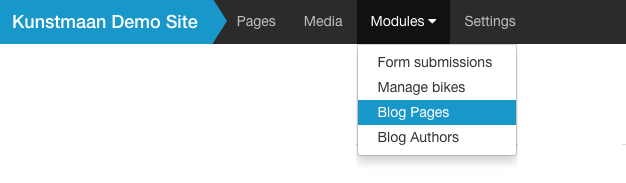
Preparing the menu adapter
First thing to do is to look if there's a menu adaptor present.
Have a look at Resources/config/services.yml, there should be an entry that looks like this one:
websitebundle.admin_menu_adaptor:
    class: ACME\WebsiteBundle\Helper\Menu\AdminMenuAdaptor
    arguments: ["[@security](https://github.com/security).authorization_checker"]
    tags:
        -  { name: 'kunstmaan_admin.menu.adaptor' }
This will make sure the provided menu adaptor class will be loaded into your application and passes the security context as optional argument with it. (See adding security rules)
At Kunstmaan we have the convention to place our menu adaptors at ACME\WebsiteBundle\Helper\Menu\AdminMenuAdaptor.php.
If you generated your bundle using the
--default-siteoption, there will already be an AdminMenuAdaptor.
Add an item to the admin modules menu
The most common place to add a menu item is the modules menu. Lucky for us, it is quite easy to do so.
<?php

namespace ACME\WebsiteBundle\Helper\Menu;

use Kunstmaan\AdminBundle\Helper\Menu\TopMenuItem;
use Kunstmaan\AdminBundle\Helper\Menu\MenuItem;
use Kunstmaan\AdminBundle\Helper\Menu\MenuBuilder;
use Kunstmaan\AdminBundle\Helper\Menu\MenuAdaptorInterface;
...

class AdminMenuAdaptor implements MenuAdaptorInterface
{
    public function adaptChildren(MenuBuilder $menu, array &$children, MenuItem $parent = null, Request $request = null)
    {
        if (!is_null($parent) && 'ACMEWebsiteBundle_modules' == $parent->getRoute()) {

            // Menu item 1
            $menuItem = new TopMenuItem($menu);
            $menuItem
                ->setRoute('ACMEWebsitebundle_admin_function')
                ->setLabel('Menu item 1')
                ->setUniqueId('menuItem1')
                ->setParent($parent);
            if (stripos($request->attributes->get('_route'), $menuItem->getRoute()) === 0) {
                $menuItem->setActive(true);
                $parent->setActive(true);
            }
            $children[] = $menuItem;

            ...
Note the $menuItem = new TopMenuItem class instantiation. This will generate an item in the top menu.
You can add as many items to the list as you want. Just make sure the setRoute method points to an existing admin route of your application. Like an indexAction of an adminlist controller.
When you add a custom adminlist to the system, you have to manually add a link in the cms admin modules menu using this technique.
Add an item to the admin main menu
Adding an item to the top menu works the same way as adding an item to the modules menu. The only difference is using if (is_null($parent)) {}
Add an item to the side menu
If you want to add a menu item to the side menu, you can do so by adding the following codesnippet to your adminMenuAdaptor
        if (!is_null($parent) && ('ACMEWebsiteBundle_settings' == $parent->getRoute())) {
            $menuItem = new MenuItem($menu);
            $menuItem
                ->setRoute('ACMEWebsiteBundle_settings_project_list')
                ->setLabel('Sidemenu item')
                ->setUniqueId('sidemenuItem')
                ->setParent($parent);
            if (stripos($request->attributes->get('_route'), $menuItem->getRoute()) === 0) {
                $menuItem->setActive(true);
                $parent->setActive(true);
            }
            $children[] = $menuItem;
        }
Note the $menuItem = new MenuItem class instansiation. This will generate an item in the side menu.
How can I help you explore Laravel packages today?