Phpunit Result Printer Laravel Package
codedungeon/phpunit-result-printer
Modern, pretty result printer for PHPUnit. Easy install via Composer, optional init script updates phpunit.xml and adds a default phpunit-printer.yml. Supports CLI/manual configuration, upgrade notes, and optional AnyBar integration (off by default; PHPUnit 7.1+).
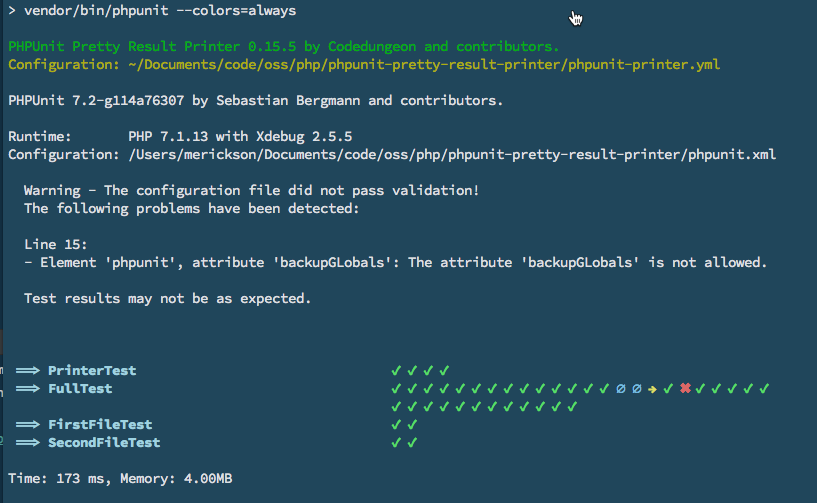
CodeDungeon PHPUnit Pretty Result Printer
Version 0.29.2 Extend the default PHPUnit Result Printer with a modern, pretty printer!
📦 PHPUnit Pretty Result Printer -- Packagist
Installation
Installation provided via composer and can be done with the following command, the current version requires PHP 7.1 or greater:
> composer require --dev codedungeon/phpunit-result-printer
Upgrading to >= 0.29.x
If you are upgrading from previous verison and have published phpunit-printer.yml locally, make sure add the following to the options section
  ...
  cd-printer-dont-format-classname: false
  ...
Execute Initialization Script (Optional)
The following steps are optional, but will provide zero configuration for implementing phpunit-pretty-result-printer
- Adds
printerClass="Codedungeon\PHPUnitPrettyResultPrinter\Printer"tophpunit.xmlfile - Copies default
phpunit-printer.ymlto project root for easier customization
> php ./vendor/codedungeon/phpunit-result-printer/src/init.php
Manual Configuration
Alternately, if you wish to configure phpunit-pretty-result-printer manually, you will need to update your phpunit.xml file as follows
<?xml version="1.0" encoding="UTF-8"?>
  <phpunit printerClass="Codedungeon\PHPUnitPrettyResultPrinter\Printer">
    // ....
  </phpunit>
Or from Command-Line:
> phpunit --printer=Codedungeon\\PHPUnitPrettyResultPrinter\\Printer
Laravel 5.3 with PHP version 7.0.x
If you are using PHP 7.0.x, you will need to use a compatible version of PHPUnit Result Printer (version 0.8.x)
> composer require --dev codedungeon/phpunit-result-printer:^0.8
AnyBar Integration
If you have AnyBar installed, it will be enabled by default. You can disable using cd-printer-anybar-enabled option (see below)
https://github.com/tonsky/AnyBar
**Anybar is off by default, thus you will need to set the cd-printer-anybar option in the phpunit-printer.yml to true if you wish to use Anybar.
This has been done to address issues with using CI tools such as travis (please see Issue 122 for details) **
NOTE: AnyBar is only available with PHPUnit 7.1 or greater. If you need support for previous versions, please let us know. We are slowly deprecating versions before 7.1.
Configuration Options
- Create a
phpunit-printer.ymlfile in your application root to override default (or anywhere use up the parent tree. It will search recursively up the tree until a configuration file is found. If not found, default configuration will be used). The following options are available (along with their default values):
Options
| Property Name | Default | Description |
|---|---|---|
cd-printer-hide-class |
false | Hides the display of the test class name |
cd-printer-simple-output |
false | Uses the default PHPUnit markers (but still uses Printer) |
cd-printer-show-config |
true | Show path to used configuration file |
cd-printer-hide-namespace |
true | Hide test class namespaces (will only show print class name) |
cd-printer-anybar |
true | Enable AnyBar (if anybar is not installed, settings will be ignored) |
cd-printer-anybar-port |
1738 | Define AnyBar port number |
cd-printer-dont-format-classname |
false | Show entire classname* |
- If
cd-printer-hide-namespaceset tofalseandcd-printer-dont-format-classnametofalsewill attempt to keep everyting formatted - If
cd-printer-dont-format-classnamenothing will be formatted and full classname will be displayed
Markers
You can customize the markers which are used for success, fail, error, skipped, incomplete by modifying the phpunit-printer.yml file.
| Marker | Value * |
|---|---|
| cd-pass | "✔ " |
| cd-fail | "✖ " |
| cd-error | "⚈ " |
| cd-skipped | "→ " |
| cd-incomplete | "∅ " |
| cd-risky | "⌽ " |
* Notice space after each marker. This makes the output a little more visually appealing, thus keep that in mind when creating your own custom markers
License
Copyright © 2017-2021 Mike Erickson Released under the MIT license
Credits
phpunit-result-printer written by Mike Erickson
E-Mail: codedungeon@gmail.com
Twitter: @codedungeon
Website: https://github.com/mikeerickson
Screenshot
How can I help you explore Laravel packages today?