
Bridge Bricks by 20steps inc. Symfony 3 to Drupal 7.x
The bundle deeply integrates Bricks by 20steps including Symfony 3 with Drupal7 and vice versa. This is done without altering Drupal's core.
When this bundle is activated, the Symfony 3 console will have the Drupal 7.x libraries autoloaded. So, it makes possible the use of Drupal libraries from your Symfony 3 command.
Install
Download the Bricks by 20steps Drupal 7 edition
Configuration
Adapt the etc/config/cms.yml file to your needs:
parameters:
    session.flashbag.class:       Ekino\Bundle\DrupalBundle\Port\DrupalFlashBag
    session.attribute_bag.class:  Ekino\Bundle\DrupalBundle\Port\DrupalAttributeBag

framework:
    # ... configuration options
    session:
        # ... configuration options
        storage_id:     ekino.drupal.session.storage

ekino_drupal:
    root:          %kernel.root_dir%/../web
    logger:        ekino.drupal.logger.watchdog
    strategy_id:   ekino.drupal.delivery_strategy.symfony
    # attach a security token to the following provider keys
    provider_keys: [main, admin]

    # not required
    entity_repositories:
        # 3 equivalent examples of configuration:
        - { bundle: page }
        - { type: node, bundle: page }
        - { type: node, bundle: page, class: Ekino\Bundle\DrupalBundle\Entity\EntityRepository }
        # you can also define an entity repository:
        - { type: node, class: Application\Ekino\Bundle\DrupalBundle\Entity\Node\NodeRepository }

    # switch to true if you want to prefix the name of Symfony tables
    table_prefix:
        enabled: false
        prefix:  symfony__
        exclude: [users]

    # optional
    session:
        refresh_cookie_lifetime: true # default value: false

# declare 2 required mapping definition used by Drupal
doctrine:
    dbal:
        driver:   %database_driver%
        dbname:   %database_name%
        user:     %database_user%
        host:     %database_host%
        port:     %database_port%
        password: %database_password%
        charset:  UTF8

        mapping_types:
            longblob: object
            blob: object

        # Tips: this allows Doctrine to consider only tables starting with
        # "symfony__" during a migration generation.
        # Think to add Doctrine migrations table here or configure it in
        # the doctrine_migrations section (table_name)
        schema_filter: ~^(symfony__|migration_versions)~
The bundle comes with 3 delivery strategies:
- ekino.drupal.delivery_strategy.background: Drupal never returns the response, Symfony does
- ekino.drupal.delivery_strategy.drupal: Drupal always returns the response, even if the page is 404
- ekino.drupal.delivery_strategy.symfony: Drupal returns the response only if the page is not 404
The (optional) section entity_repositories allows you to easy interact with
Drupal 7.x API to retrieve contents and handle it from Symfony code.
The configuration offers default values:
- default entity type is
node - default repository class is
Ekino\Bundle\DrupalBundle\Entity\EntityRepository, feel free to configure yours
Update Queries
UPDATE users SET `emailCanonical` = `mail`, `usernameCanonical` = `name`, `roles` = 'b:0;';
Usage
Symfony services can be used from within Drupal:
<?php
function drupal_foo_function() {
    $result = symfony_service('reusage_service')->foo();

    // do some stuff with $result
}
Security
You can secure a Symfony route with a Drupal permission, with prefix PERMISSION_DRUPAL_. Like it:
security:
    role_hierarchy:
        # ...

    firewalls:
        # ...

    access_control:
        - { path: ^/symfony/admin, role: PERMISSION_DRUPAL_ACCESS_ADMINISTRATION_PAGES }
The PERMISSION_DRUPAL_ACCESS_ADMINISTRATION_PAGES is translate in "access administration pages" and used with user_access and global Drupal user.
If you want use you "personal access" permission, use role PERMISSION_DRUPAL_PERSONAL_ACCESS for example.
Limitations
- It is not possible to use Symfony native class to manage session as Drupal initializes its own session handler and there is no way to change this.
Preview
If installation is completed successfully, the welcome page looks like:
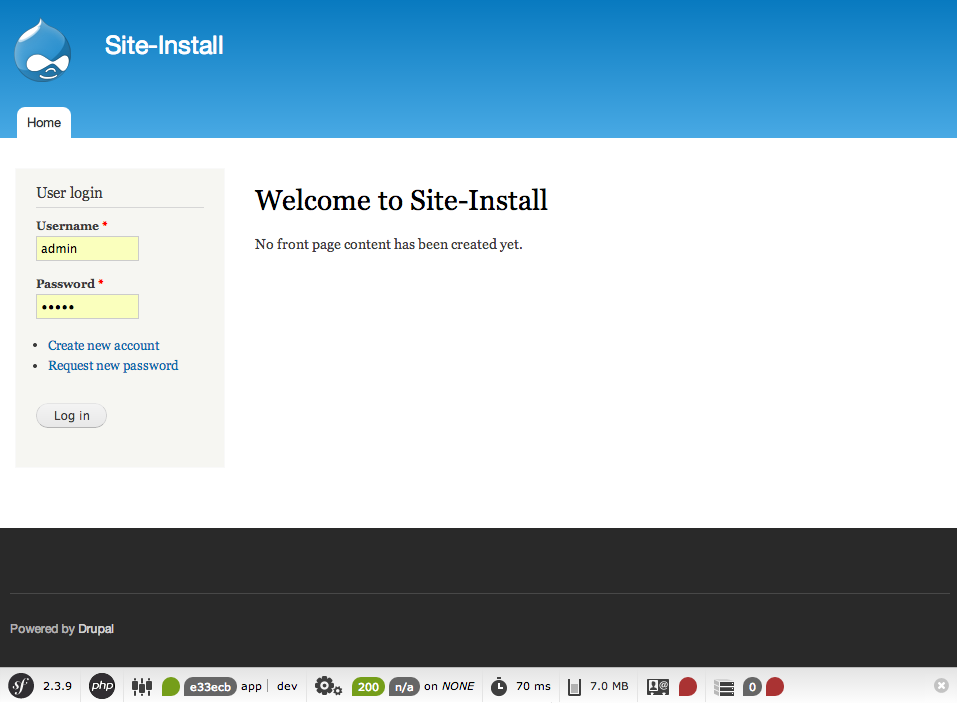
You can note the Web Debug Toolbar of Symfony at the bottom ;-).
How can I help you explore Laravel packages today?